 Cutvo
CutvoYou film.
Cutvo cuts the rest.
Removes silences, “umm”s and the sentences you said twice — automatically. And you see every cut before you export.
What does it remove?
Everything that eats your editing time — found for you.
Long silences
Gaps between sentences, and the dead air at the start and end.
Filler words
“umm”, “uh”, “er” — and you can add your own, like “like”.
Retakes
When you start a sentence and say it again, only the last take stays.
Stutters
“I I think…” becomes “I think…”.
Just 3 steps
No complicated settings, no editing experience needed.
Pick a video
Any video or audio file, in any language — it detects the language itself.
Analyze
You get a list of every silence, filler and retake, with its time and length.
Review & export
A finished video, SRT subtitles, and an XML timeline for Premiere and Resolve.
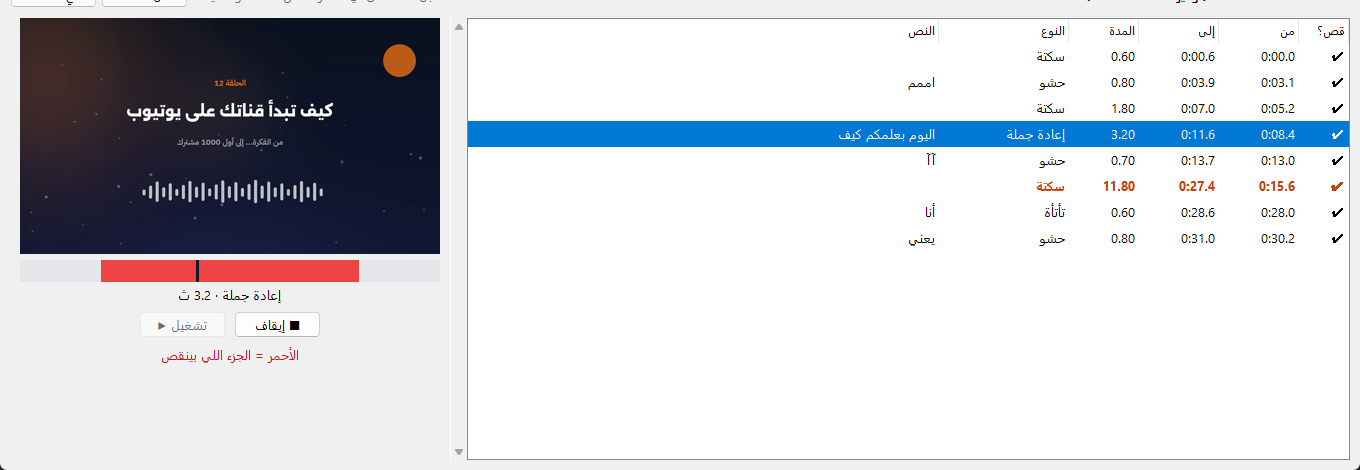
See every cut before you export New
Click any cut in the list: you get a still of that moment, and you can play it with sound. The red part is what gets removed.
- Plays from one second before the cut to one second after
- Long silences are highlighted so you notice them
- Double-click any cut to keep it
Hear the difference
An English take with “umm”s, an “uh” and a retake — before and after Cutvo.
Works with everything
20+ languages
Any graphics card
Picks the fastest engine for your PC.
Any editor
A finished MP4, or XML / EDL cuts you can still adjust.
Your videos never leave your PC
All analysis and cutting happens on your computer — nothing is uploaded.
Works offline
After the first run, no internet needed.
No subscription
Buy once, keep it.
How to buy
Each copy is activated on one PC with its own key.
Download & install
One 105 MB installer that sets itself up for your graphics card.
Copy your device code
It's on the activation screen the first time you open Cutvo.
Send it to us
To hello@cutvo.app or @getcutvo, with your payment.
Activate
You receive your license key — paste it and start.
System requirements
| Minimum | Recommended | |
|---|---|---|
| OS | Windows 10 (64-bit) | Windows 11 |
| Graphics | AMD, Intel or NVIDIA | NVIDIA GeForce RTX |
| RAM | 8 GB | 16 GB |
| Disk | 5 GB | 8 GB |
| Internet | Only for setup and the first analysis | |
FAQ
Windows says “Windows protected your PC”. Is it safe?
Yes. The message appears because Cutvo is new. Click “More info”, then “Run anyway”.
Will it cut footage I need?
Cutvo only suggests cuts — you preview each one and can keep any of them before exporting.
Does it run on Mac?
Windows 10 and 11 only, for now.
I changed my PC or reinstalled Windows. What now?
Send us your new device code and we'll send a key for it.
Does it upload my videos?
No. Everything happens on your PC. The internet is only used once, to download the speech-recognition model.
Can I keep editing in CapCut or Premiere?
Of course — export the cut video (plus SRT subtitles), or an XML timeline for Premiere and Resolve.